mfam16
-
Posts
254 -
Joined
-
Last visited
-
Days Won
14
Content Type
Profiles
Forums
Gallery
Everything posted by mfam16
-
Have you tried replacing the batteries in any of the fobs? One of our X had same msg. I opened up the fob replaced both batteries and msg immediately went away
-
I very rarely follow CR data. That being said, I'm happy with both our X. Would I purchase Lincoln in the future, maybe. My X had more fit and finish issues vs my wife's X. Mechanically both have been solid so far and I don't expect to have any issues. Yes the fit and finish is an annoying issue, it wasn't a deal breaker. Maybe CR data will help Lincoln in the future
-
we have 2 X one with 20" with Hankook and the other with 21" with Pirelli. The 20" ride smoother both look great and both tires function well as far as traction
-
Thats cool. I have never had issues with voice commands so I rarely if ever need my phone or infotainment center while driving. We can agree to disagree.
-
It was not that important to me to goto dealer. One day I may but for now I will just turn it down when prompts start yelling for those who missed elijahbird's post http://lincolnmkxforum.com/topic/1640-navigation-shouting-lady-dealer-fixed-itafter-some-confusion/?p=7103
-
I could not take a pic while driving but a msg comes up when scrolling down audio playlist while in AA. It is annoying, however, I do agree it is a safety feature. I would rather people not scroll through their audio playlists or Nav favs while driving. I believe this feature is disabled when parked or not moving. I will look into it later on today. Where I agree it can be irritating is Sync natively does not limit on how much you can scroll via audio playlists (I havent tested on Nav), which makes it confusing and irritating when expecting same functionality when using AA.
-
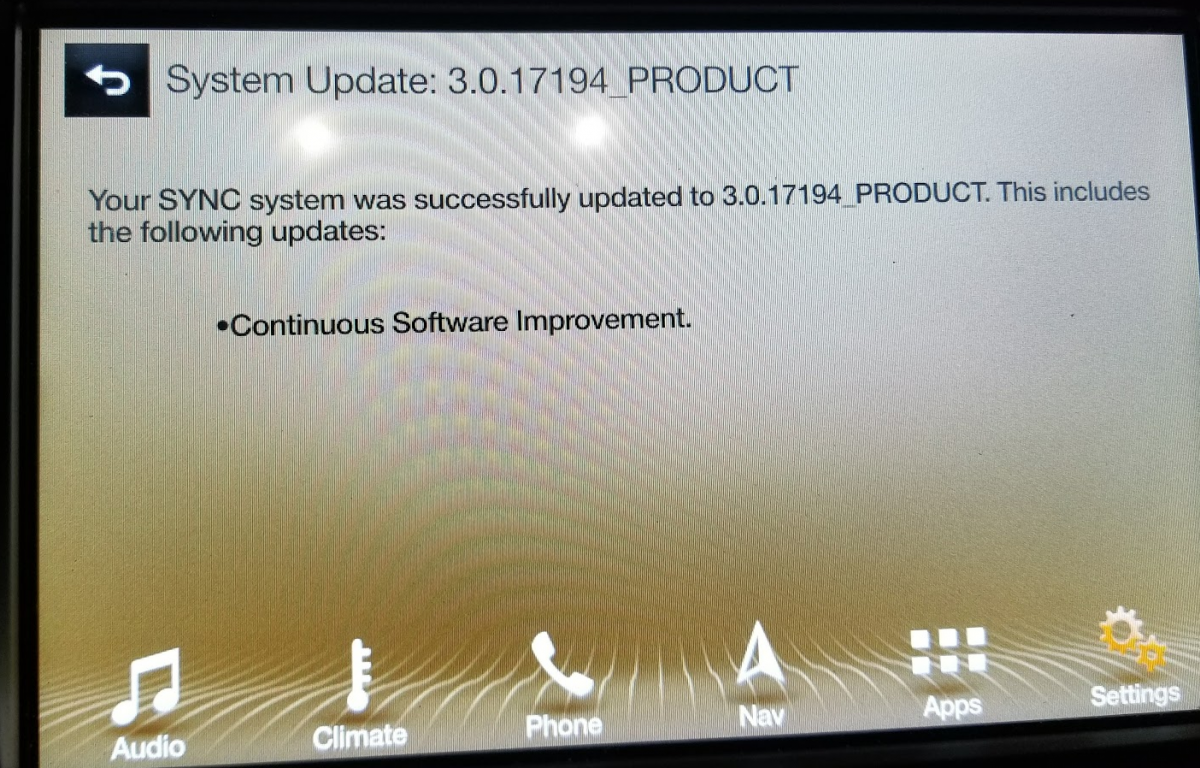
So audio prompts still initiate the volume at 17 when Nav starts (I know not everyone has this issue, but for those who do, the update did not fix it). Scrolling while in AA is still the same it will lock at 3rd/4th scroll. This is a "Security Feature" as is states when reaching max scrolls either in Waze, GMaps, Audio Play list, etc. So far I haven't noticed any significant changes, so I'm guessing it was more of a "stability" update to fix reported issues.
-
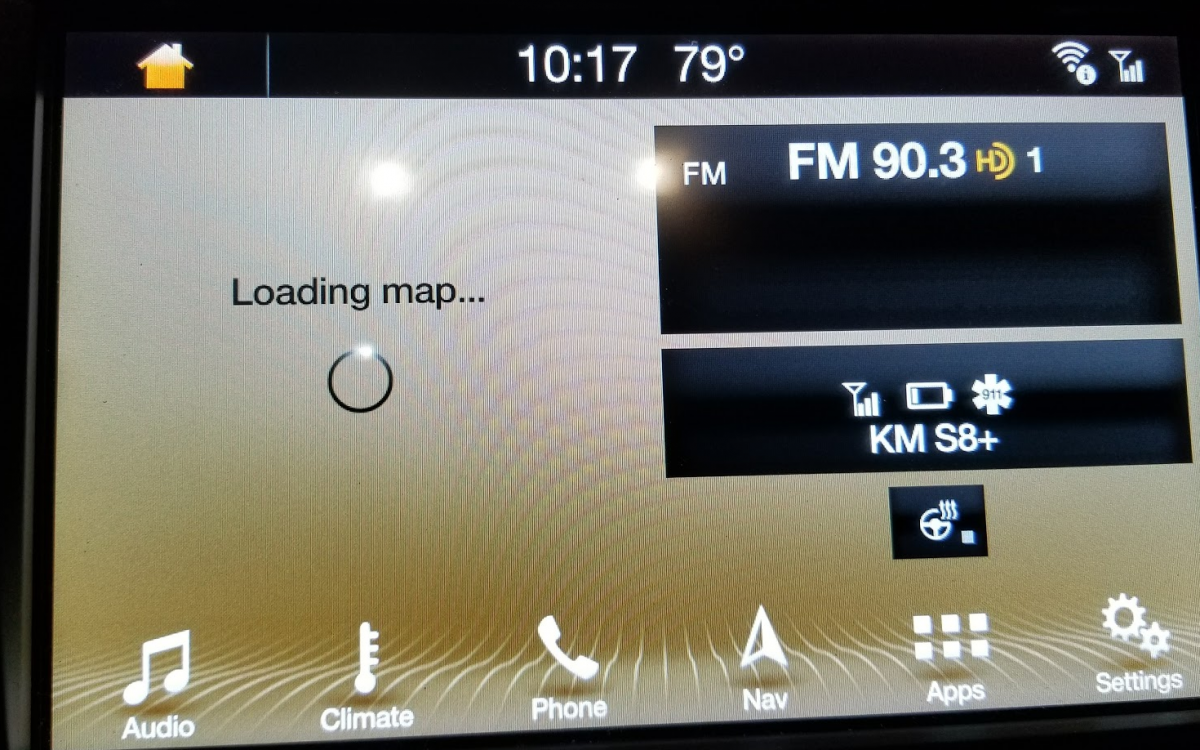
I haven't tried out nav vol ( I have same issue as Akirby) will report back as soon as I test it. As far as screen locks from numerous touches I have never had that problem. Install took about 30 minutes from flash drive. Unzipped main files to a flash drive plugged it into usb port of the X. Started vehicle. At first it did not seem like anything was hapening, then in top left corner is had msg I think it said "Updating Software" after update was complete it gave msg that update was complete and usb drive can be removed and that update will complete on next start-up. Changes I have noticed are: 1. Main screen now has steering wheel heater icon 2. Nav Icon has changed I just recently installed and haven't tested anything from just scrolling through menus. If I notice anything different I will update. Hope this helps!


-
For those who only show 1.0 in car but 2.2 online, try going into cars settings and disabling auto update and then turn it back on. Do this while connected to you home or portable WiFi. This should"force"the system to check for any available updates. I'm not totally sure this will work but it's worth a try.
-
Glad dealer is taking care of this issue. Enigma is 100% correct, but to answer your question disconnecting battery should do the trick as well
-
I'm usually a big fan of diy. However, in this situation is best to let Lincoln fix issue specially if it's a more complicated issue. It's been a while since I've removed an airbag. Most important thing is to find fuse and remove it to deactivate the trigger mechanism or at least that's how I remembered how to safely remove an airbag. The part would just pop out with little force and then you should be able to disconnect connecter and find out what's rattling in there
-
I had dealer address the 17B01 msg. It did not change status in app as far as displaying actual tire pressure. It still shows monitoring. Also it took a day for the 17B01 warning to clear out of the app.
-
I don't think it Auto Updates but you can goto the Google Play Store and select my apps under settings and then select update all to update all apps with available updates or you can select which app )i.e. The Lincoln Way app and update it without updating all other apps.
-
Seems like the module was functioning well. It just needed to be reprogrammed. Service was very busy today but it took a little over 1.5 hrs. Update: app still shows msg about module. I figured once Lincoln fixed issue the msg would go away, however, for now it's still there
-
I just took my X in to have issue "fixed". I'll update on what the issue was.
-
So far I still see both tire status as monitoring and oil life percentage status. I'm running the app on an Android phone.
-
I have had terrible experiences with our Lexus Dealer. So in turn, where I live I would say yes, Lincoln CS beats out Lexus. This goes back to the main point many have stated in the past. Dealerships can make or break the brand they represent. Also another main factor is Ford/Lincoln needs to improve the quality control from the factory. If they fix the QC then it will help reduce issues at the some of the dealerships who don't care, like yours. As stated before we have two X's. One had issues with sensors needing recalibration, headlamp firmware flash, and a battery disconnect for the module to communicate with mobile app (this was our first X) The second one has had more issue, B pillar on driver side door not fully seated, USB hub in center stack had broken clips not securing it fully, temp control sensor failure, lock inside driver door handle detached due to broken clip, and now I have msg in app about potentially defective module. Had our second X been our first purchase I would have reconsidered a different brand on our second vehicle. However, since I'm a patient person and since we have great service from our dealer, I am more tolerable to these issues as every issues has been fixed with the exception of the last one regarding msg from mobile app due to me not having time to address the issue. That being said, its obvious that if/once Ford improves their QC, then some may start to consider them as a "Luxury Brand"
-
That really sucks! Nothing is worse than having a great product with crap service. If only our domestics placed same value on their service, more people would buy and value their vehicles.
-
Update: Haven't had time to go by the dealer, but one interesting thing is that the msg only shows up for my vehicle but not my wife's.
-
I have same msg. If anyone gets more info, please share.
-
I agree. There are speculations that the "unofficial release" and 2.26 were beta. However, the "unofficial" release is the exact same build number as the one on Lincoln's site. You will be fine as that is the version I've been running for a while now without any issues
-
I went back to the post where someone with a MKC had installed a hub by themselves. [ http://www.f150forum.com/f118/current-sync-3-carplay-android-auto-information-360660/index33/#post5081080] It looks like the part number I've been posting is incorrect as it has two usb ports. Also to your other question, I think [basing it off of logic] that only the new hub will work with carplay. Reason being it would require apple's security protocol for I believe mfi. Even though I am not a fan of iOS, it would be cool if they had an adapter you could just plug into existing hub to become certified and allow CP.
-
When you try again, let update check run its complete course without leaving Wi-Fi network. This should insure you get proper communication. Also Ford's servers may be lagging behind in site info. Give it a couple of day and recheck owner's site to see if info is current. I personally would not stress over it as it will not effect functionality.
-
Is it showing v1 on the owners.lincoln site? Quick way the owner's site to site update is to goto your vehicle. Goto settings, select auto update, select check for updates. (Note: you will need to be connected to home Wi-Fi) afterwards go back to owner's site and it should show your latest version 2.2
-
From what I've read, the USB port needed for CP in Lincoln's is GJ7Z-19A387-B which is the white USB Port with LED's - List Price: $63.01 USD. I don't have any iOS products so I cannot confirm if this is indeed the correct part.